This page describes how One Final Message collects SMS consent, what messages users receive, and how to opt out.
SMS Consent
Users explicitly opt in to receive SMS messages from One Final Message by entering their phone number in account notification settings and confirming ownership via a one-time verification code sent by SMS.
SMS notifications are disabled by default and are only enabled after successful verification. Verification of a phone number serves as confirmation of consent to receive transactional SMS messages related to user-initiated workflows.
How Users Opt In
- User navigates to Account Settings > Phone Numbers
- User clicks Add Phone Number
- User enters their phone number
- User receives a one-time verification code via SMS
- User enters the verification code to confirm ownership
- SMS notifications are now enabled for that number
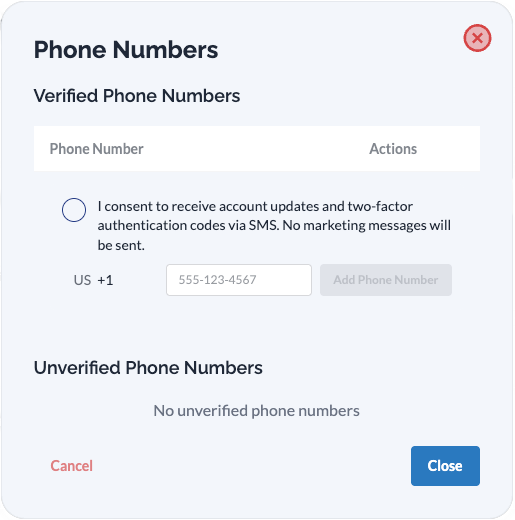
Users must complete verification before any SMS messages are sent. Unverified numbers do not receive messages.
SMS Message Types
Messages sent by One Final Message are transactional and user-initiated. These include:
| Message Type | Description |
|---|---|
| Verification codes | One-time codes to confirm phone number ownership |
| Check-in confirmations | Scheduled reminders asking users to confirm they are okay |
| Delivery notifications | Alerts when a user's stored message has been delivered |
One Final Message does not send marketing or promotional SMS messages.
Message frequency depends on the user's chosen check-in schedule (daily, weekly, monthly, quarterly, or yearly) plus occasional verification codes when adding new phone numbers.
Opt-Out and Help
Reply STOP to opt out. You may opt out of SMS messages at any time by replying STOP to any message.
Reply HELP for assistance. For help, reply HELP or contact support at support@onefinalmessage.com.
Message and data rates may apply.
All opt-out requests are processed immediately and automatically upon receipt from our messaging providers. You do not need to contact support to stop messages.
Additional Opt-Out Methods
Users can also opt out by:
- Removing their phone number from Account Settings > Phone Numbers
- Deleting their One Final Message account entirely
Bounce signals (invalid numbers, carrier blocks) are processed immediately and automatically stop future messages to that number.
Additional Information
Contact Verification Process
When you add an email address or phone number to your account, we verify it belongs to you before using it for notifications. This protects both you and our service from unauthorized use.
Verifying an Email Address
When you add an email address, we send a verification link. Click the link to confirm you have access to that inbox.
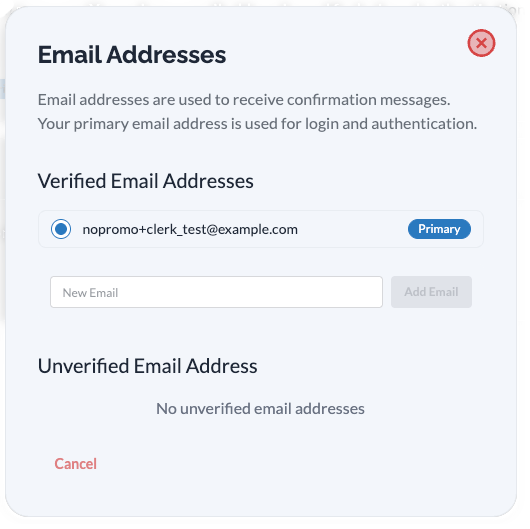
Your Verified Contact Methods
Once verified, your contact methods appear in your account settings with a verified badge. Only verified methods are used for notifications.
How We Use Your Contact Information
Your verified contact methods are used exclusively for:
- Check-in confirmation requests - At your chosen interval
- Delivery status updates - When your messages are delivered
- Critical account notifications - Security alerts and service updates
We never share your contact information with third parties or use it for marketing purposes.
Managing Your Contact Methods
You have complete control over your notification preferences at any time. Visit your account settings to add or remove contact methods.
At least one verified contact method must remain active for check-in scheduling to work.
Questions?
If you have questions about how we handle your contact information, see our Privacy Policy or contact us directly.
Program Name: One Final Message Support Email: support@onefinalmessage.com Support URL: https://onefinalmessage.com/contact